Table of Contents
Overview
Control-Online Extract-Transform-Load, CoETL (pronounced like Kettle) takes the Cyrious Online data and transforms it for import into Cyrious Control.
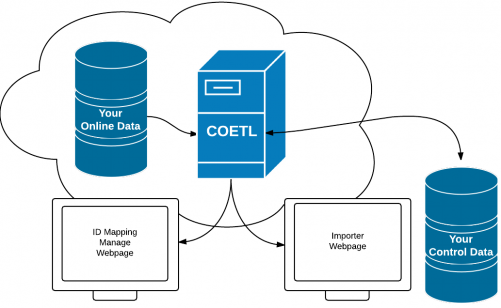
CoETL Tools
- Connection Manager - This feature will test if the connection between Cyrious Online and Cyrious Control is active. http://coetl.cloudapp.net:13440/StaticFiles/test.html
- ID Mapping - This feature will help you create and manage the relationships between online data and control data. http://coetl.cloudapp.net:13440/StaticFiles/manage.html
- Manual Import - This feature will manually import all data since your last successful import. http://coetl.cloudapp.net:13440/StaticFiles/index.html
CoETL Setup
CoETL needs the following information setup prior to your first import. Your server firewall will need to be configured to allow for the information transfer. Please see the email sent to you by the Cyrious Online team titled “Preparing your Environment for Cyrious Online Import”
- CoETL Username - This will be your username to all 3 CoETL websites listed above. Your company will only have one. Please make sure it is something you are comfortable sharing with any staff working on the Cyrious Online project.
- CoETL Password - This will be your password to all 3 CoETL websites listed above. Your company will only have one. Please make sure it is something you are comfortable sharing with any staff working on the Cyrious Online project.
- Control Database Server - This is your External IP Address from your Control Server.
- Control Database Instance - This is the name of your SQL Instance on your Control Server. Standard Configuration is “CYRIOUS”.
- Control Database Name - This is the name of your SQL Database for Control. Standard Configuration is “StoreData”.
- Control SQL SSLIP Port - Standard Configuration is “1433”.
- Control Chapi Port - Standard Configuration is “12556”.
- Default Control Salesperson ID - The ID in Control (Employee table) for the salesperson to attach to imported orders by default.
- Default Control Product ID - The ID in Control (CustomerGoodsItem View) for the default product assigned to imported line items by default.
- Default Control Account ID - The ID in Control (Account table) for the company to assign to imported orders by default.
- Default Control Account Contact ID - The ID in Control (AccountContact table) for the contact to assign to imported orders by default. NOTE: This should be a contact on the DefaultControlAccount.
- Default Control Order Station ID (Optional) - The ID in Control (Station table) for the station to be assigned to imported orders by default.
If you aren't certain how to gather this information or comfortable in SQL, please contact our online team at online@cyrious.com for help gathering this information. You can also click coetl_sql_reportsfor SQL reports that will help you gather the default IDs.
ID Mapping
- CoETL will automatically map products and derived products by name when importing from Online. This means that you do not have to explicitly map them using ID Maps. i.e. The online product Step Stakes will always map to the Control product Step Stakes, etc. Online products that map to derived products in Control will have all of their non-overridden values filled in by that derived product's base product.
- CoETL will automatically map Contacts to existing Control Companies. If a match cannot be found within the existing Control Company, it will create a new Contact during the import.
- All Online Companies and Employees will need to be mapped to their Control counterpart using CoETL's ID Mapping. Additionally, any products not using a direct name match will need to be mapped using CoETL's ID Mapping. For example, you create multiple Business Card products online for different storefronts but want to match them all to Small Format Print (or one Derived Product called Business Cards). This will need to be defined using CoETL's ID Mapping.
- Click coetl_id_mapping for more information on coetl_id_mapping. Cyrious Online IDs can be found on the website. If you have issues finding this information, please reach out to our online team via chat or email. Control IDs will need to be retrieved from SQL. If you aren't comfortable with SQL or don't have access to your server, please reference the SQL reports mentioned in the CoETL Setup section.
- If a match cannot be made through name or ID, CoETL will use the defaults provided from the CoETL setup section for the import.
Variable Mapping
- All Online Attributes (variables) that have the same exact Variable name within Control will be auto-mapped. This means that you do not have to explicitly map them in ID Maps. i.e. The online attribute Height will always map to the Control variable Height, the online attribute Width will always map to the control variable Width, etc.
- For Variables that don't have the same Variable name within Control can be mapped inside Control. Using the Import Map feature found on the products, you can specify how Online Attributes should be mapped to Variables and Modifiers how your pricing forms. Click here for more information about Control's Import Mapping.
References
Created : {$creationdate}
Revision : {$revisiondate}
Links